
- In Coreldraw, go to Tools > Options
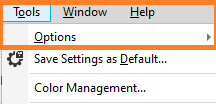
- In the Options list select Workspaces

- In the Workspaces window, verify that the Default workspace is selected

- If the Smart Designer toolbar does not appear after setting Coreldraw to the Default workspace, please reset your Coreldraw to default workspace. (Refer to help article below)
Resetting Coreldraw to Default – Graphics Flow (zendesk.com)
Comments
0 comments
Please sign in to leave a comment.