
Resetting your Corel Font Manager database deletes the existing font cache and forces the application to regenerate it from scratch. This resolves critical errors like CorelDRAW crashing, hanging on launch, or displaying "No fonts were found". It also clears custom font folders and filters.
- Verify that Coreldraw is closed
- Hold down the F8 key (Note: Some newer keyboards have an "F Lock" key that must be pressed first to activate the Function keys on the keyboard.) and open the Corel Font Manager
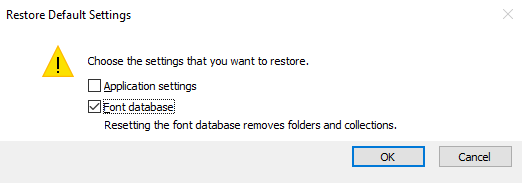
- A dialog box with appear, uncheck Application settings and check Font database, click ok
- The Corel Font manager will open and will begin analyzing the fonts

- Once finished you may open CorelDRAW
Comments
0 comments
Please sign in to leave a comment.